Content Download Overview
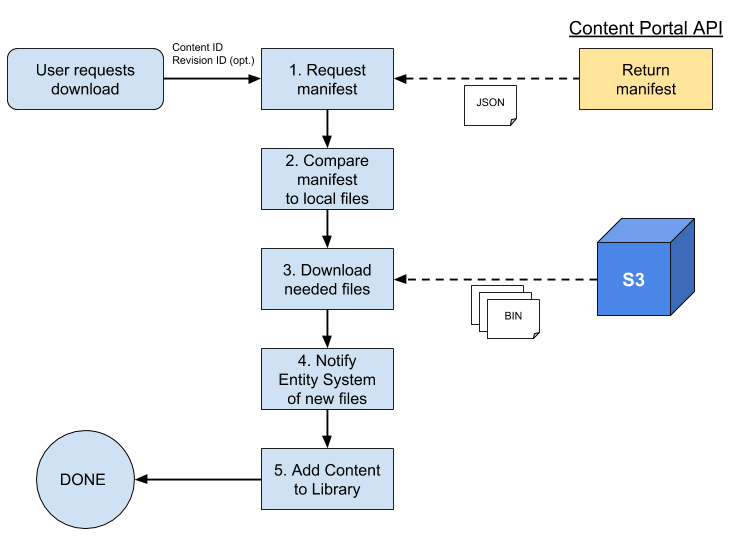
Figure 1 provides a high-level description of the workflow involved with downloading an item from the Content Portal.
The workflow is initiated by a user's request to download a content item. This selection is assumed to identify the content item by ID, and possibly by revision ID. If a revision ID is not specified, it is safe to assume the most recent available revision.
Steps
- The game client begins by requesting a manifest file from the API. This JSON file describes the dependencies of the item, with their file size and their path within the S3 content bucket.
- The game client then compares the dependencies listed in the manifest file against the files that are currently available on the user's local file system. There is no reason to download a dependency twice, as the pair of entity-ID/revision-ID identitifes an immutable resource.
- Now knowing which dependencies need to be downloaded, the game client downloads those files.
- Having successfully downloaded all dependencies, the download logic notifies the Entity System of the files for it to complete any initialization or registration.
- The download logic also registers the new content item so that it will display in the Library view.
At this point, the download is complete and the user may play or edit the content item.